Canvas Parent
- 4.3
- Rating
- 500.00K
- Installs
- Free
- Price

 Analysis by App-foxy
When I tried Canvas Parent, the main value became clear very quickly: it gives a parent a compact view of a child’s school activity without requiring the parent to sit beside the student and open every class separately. That sounds simple, but it changes how I would use a learning platform at home. Instead of asking only, “Did you do your homework?”, I can use the app as a starting point for a more useful conversation about what is due, what has been completed, and where schoolwork may be becoming difficult.
This is an education app from Instructure, offered free of charge for everyone. It is designed for parents rather than students, so I would not treat it as a replacement for the main Canvas learning environment. Its job is visibility: helping me understand the shape of my child’s school day from a parent’s perspective. That focused purpose is also its biggest strength, because it avoids trying to become another full classroom workspace.
Seeing school progress without taking over the student’s workspace
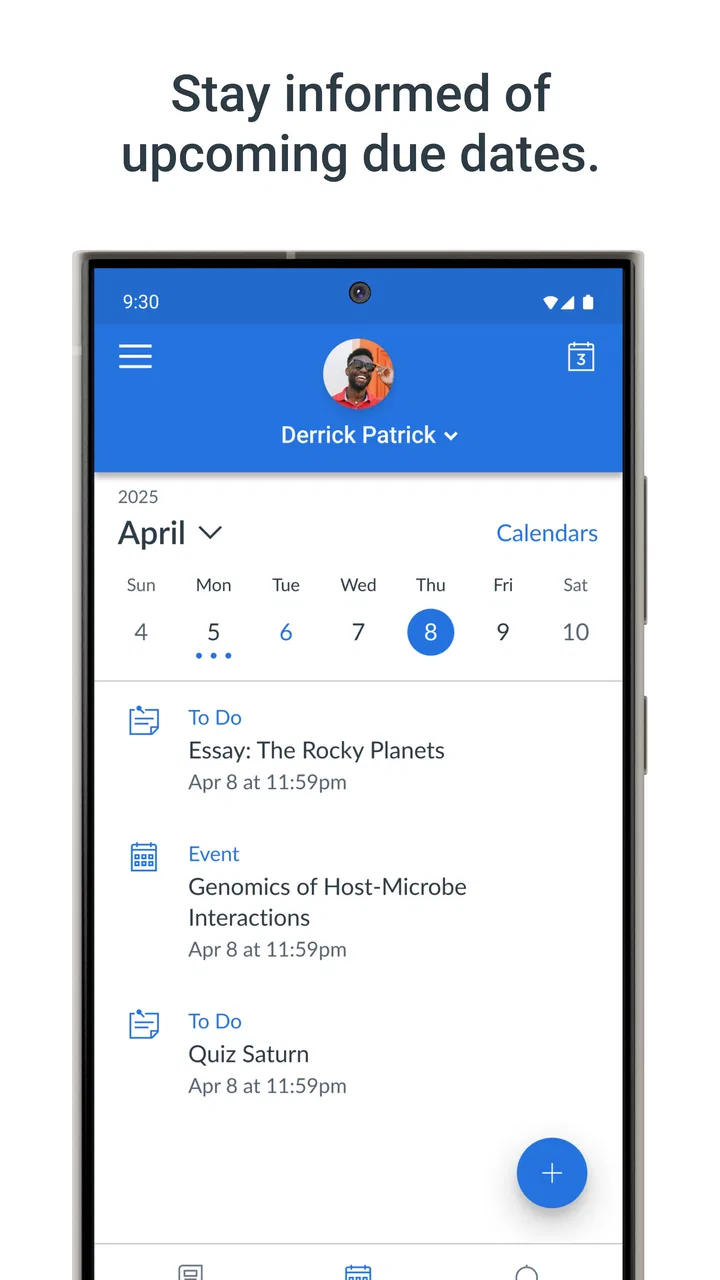
The central capability is at-a-glance access to a child’s education. In everyday use, that means I can check the information that matters most to a parent: upcoming academic responsibilities, recent activity, and the general state of coursework. The benefit is not simply convenience. It is the ability to notice patterns early, before a missed task turns into a larger problem.
You May Also Like

 Blood Strike: 2.5 Anniversary
Blood Strike’s Loadouts Turn Every Drop Into a Tactical Gamble
A close look at Blood Strike’s custom loadouts: how fast access to signature weapons reshapes its battle royale rhythm, rewards preparation, and narrows the gap between fights.

 Pandora - Music & Podcasts
Pandora’s Music Is Easy to Start, but Harder to Recover
Pandora’s strength is its low-effort path from a seed to a station. Its weak spot is how much confidence it asks you to place in connection, setup, and quiet recovery.

 8 Ball Pool
 Is Built on Rivalries, Rematches, and Routine
A close look at the rivalries, rematches, shared routines, and unanswered safety questions that turn a quick pool match into a persistent mobile community.

 Samsung Music
’s Quiet Strength Is Playing What You Already Own
Its reach comes less from spectacle than from dependable access to a personal library. That simplicity is both the app’s strongest retention engine and its ceiling.

 AccuWeather: Weather Radar
AccuWeather Review: A Quick, Clear Forecast for Everyday Decisions
For everyday plans, the best forecast is the one you can understand quickly. AccuWeather makes rain timing, radar, and local conditions easy to act on, with a few trade-offs.

 Hill Climb Racing
Why Hill Climb Racing Still Turns Crashes Into One More Run
A tiny car, a bumpy hill and one more upgrade: Hill Climb Racing keeps resurfacing because its simple chaos makes every near-miss feel personal.
More From Our News Desk



I like this distinction because parents often need context, not control. A student’s Canvas account is built for submitting work, reading instructions, and participating in classes. A parent usually needs a shorter route to awareness. Canvas Parent narrows the view so I can stay informed without wandering through tools intended for classroom work.
That narrower design makes the app useful for a specific kind of involvement. I can check in during a busy morning, look at the week ahead, and then ask a focused question in the evening. The conversation becomes less accusatory because it can begin with something concrete: an approaching assignment, a course that has been unusually quiet, or a task that appears to need attention.
The real advantage is earlier awareness, not deeper control. I would not install it expecting a complete parent-teacher communication system or a substitute for talking with a child. It works best as a window into the existing Canvas setup. If a school does not use Canvas in a way that exposes useful parent information, the app cannot create that connection by itself.
What the parent view changes at home
The app is most helpful when it turns vague supervision into a repeatable routine. A parent can look at school activity at a sensible time, identify one or two items worth discussing, and then leave the student to do the actual work. That separation matters. Too much monitoring can make a child feel watched; too little can leave a parent unaware of a growing backlog.
I see particular value for families with several children or complicated weekly schedules. A quick parent-focused view can reduce the mental effort of remembering every subject and deadline. It also gives a parent a way to notice when the student’s explanation and the course activity do not seem to match, without immediately assuming that something is wrong. Sometimes an item may have changed, been postponed, or require context from the teacher.
That last point is important. I would use the app to raise questions, not to make automatic judgments. A missing submission indicator does not tell the whole story, and a quiet course does not necessarily mean a student is falling behind. The app improves visibility, but interpretation still belongs to the family and school.
How I would use it during a normal school week
My preferred workflow would be short and consistent. At the beginning of the week, I would review the child’s courses and look for upcoming work that could affect the family schedule. A project, test, or larger assignment may need more planning than a small daily task. The point is not to manage each step, but to avoid discovering an important deadline at the last moment.
Midweek, I would check again only if there is a reason: the child mentioned difficulty, a deadline is close, or the workload looks unusually heavy. This keeps the app from becoming a source of constant surveillance. If everything appears normal, there is no need to turn every school day into an inspection.
At the weekend, I would use the overview to prepare for the next few days. This is one of the less obvious ways to get value from a parent dashboard. It is not merely a place to react to missed work. Used calmly, it can help a family plan transport, activities, quiet study time, and reminders around what the student actually has ahead.
For example, imagine a child who has school, sports practice, and a family commitment on the same evening. I could check Canvas Parent earlier in the day, notice that a course task is due soon, and ask whether it has already been started. If the answer is no, we can decide together when to work on it. That is more useful than discovering the problem late at night, when the only options are panic or an exhausted rush.
Practical habits that make the overview more useful
One habit I recommend is comparing the app’s information with the child’s own explanation rather than treating either source as perfect. The student may know that an assignment is being completed in stages, while the parent view may show only a broader status. Asking, “What part are you working on?” produces better information than asking, “Why is this still here?”
A second useful habit is to focus on changes rather than stare at the entire account. If a task was present yesterday and is now marked differently, that change is more meaningful than a general glance at every course. Parents can also use the overview to spot repeated trouble in one subject and then discuss support, tutoring, or a teacher conversation before frustration builds.
A third is to agree on boundaries with the student. I would explain why I am checking the app, how often I plan to look, and what I will do with what I see. That small agreement can prevent the tool from feeling like secret monitoring. Canvas Parent is more effective when it supports trust instead of replacing it.
Families should also remember that the parent view depends on the school’s Canvas arrangement and the child’s account relationship. Setup is not just a matter of downloading an app and expecting every school detail to appear automatically. The parent needs the appropriate connection to the student’s Canvas environment, and the usefulness of the information depends on how the school and teachers use that environment.
Where it fits beside the usual alternatives
The usual alternative is often a school portal, email notifications, paper planner, or simply asking the student. Those methods still have a place. Email can be better for official announcements, a planner can help a student build independence, and direct conversation provides context that no dashboard can match.
Canvas Parent sits between those options. It is more structured than relying on memory or occasional questions, but less intrusive than taking over the student’s account. Compared with a general school portal, its advantage is that it is tied to the Canvas learning environment rather than trying to cover every school service. Compared with notifications alone, an overview is better for seeing the wider pattern instead of reacting to isolated messages.
That focus also creates a limitation. If a family wants one app for attendance, cafeteria information, transportation, messaging, grades, and every school announcement, this is unlikely to be enough on its own. I would keep the school’s broader portal or communication channels available and use Canvas Parent specifically for Canvas-related learning visibility.
The tradeoff between awareness and pressure
The strongest feature can become the main source of friction if it is used too often. A parent who checks repeatedly may feel informed, but the student may feel that every change is being watched. That can make ordinary homework more stressful and may encourage the child to focus on satisfying the dashboard instead of learning.
I also would not assume that the app explains why a task is late or difficult. Status information can show that attention is needed, but it usually cannot replace the student’s perspective, teacher feedback, or a proper look at the assignment instructions. The correct response to a concern is often a conversation, not another refresh.
Another tradeoff is that the app’s usefulness varies by school. Canvas is a platform used by institutions with their own teaching habits, course structures, and communication routines. One child’s parent view may feel informative, while another may see a much thinner picture because teachers post different kinds of material. That is not necessarily a flaw in the app, but it affects expectations.
I would also skip it if I wanted a student productivity tool. The parent audience is deliberate. A student who needs a place to compose work, submit assignments, or participate in class should use the student-facing Canvas experience provided by the school. A parent who wants detailed control over every learning action may also be disappointed, because the app is better understood as an observation and support tool.
Who benefits most from this focused design
Canvas Parent is a strong fit for a parent who wants a practical way to stay involved without asking for a daily verbal report. It is especially suitable when a child is becoming more independent but still benefits from gentle reminders and occasional planning help. The app gives the parent enough information to notice a problem while leaving the student responsible for doing the work.
It can also help families where schoolwork is spread across several Canvas courses and the parent does not have time to open each class during every check-in. The overview reduces that friction. I would not call it a complete academic management system, but it can serve as a reliable first stop before deciding whether a longer conversation is needed.
Parents of younger students may appreciate the visibility, although they should be careful not to turn it into constant supervision. Older students may accept it more readily when the family agrees on reasonable boundaries. In both cases, the app works best when the goal is support: planning a busy week, noticing a repeated difficulty, or helping a student ask the right teacher for assistance.
The audience rating is Everyone, which fits the app’s parent-oriented educational purpose. It has been available since Aug 10, 2016, and the current version is 4.14.0 for devices running iOS 9 or later. Those details make it accessible to people using older compatible Apple hardware, though I would still keep the device’s operating system and the school’s Canvas setup in mind before relying on it for daily use.
What its adoption and rating suggest
Canvas Parent has passed half a million installs and holds an average rating of 4.3 from around 4.6 thousand ratings, with roughly 1.2 thousand written reviews. I read those figures as a sign of a useful but purpose-specific app: many parents find the visibility valuable, while the experience can naturally depend on how their school uses Canvas.
That context matters more than the rating alone. A parent may enjoy the app when assignments and course activity are kept current, but feel frustrated when information is delayed, incomplete, or difficult to interpret. Before judging the app, I would ask whether the school actively relies on Canvas for the work I need to monitor. The closer that match, the more meaningful the parent view becomes.
My recommendation after using it
I recommend Canvas Parent to parents who want a low-effort way to stay aware of a child’s Canvas-based schoolwork. Its best quality is restraint: it does not try to make the parent the student. Instead, it provides enough visibility to support planning, ask better questions, and respond earlier when schoolwork appears to be slipping.
I would not recommend treating it as the only source of truth or as a replacement for the student app, teacher communication, or a school-wide portal. Its value comes from combining the overview with human judgment. Check it at sensible times, discuss what you see, and allow the student to remain responsible for learning.
For a free education app from Instructure, that is a worthwhile role. Canvas Parent will not solve every family’s school-communication problem, but when a child’s school already works through Canvas, it can turn a vague feeling of being out of the loop into a clearer, calmer understanding of what needs attention.
FAQs for Canvas Parent
01What is Canvas Parent, and who is it designed for?
Canvas Parent is a mobile companion app for parents and guardians whose children use Canvas LMS at school. After connecting to a participating school or institution, parents can review course information, assignment details, grades, announcements, and upcoming deadlines. The available features depend on how the school has configured Canvas and whether parent observer access has been enabled.
02How do I connect my child’s Canvas account to Canvas Parent?
To use Canvas Parent, you generally need a pairing code or account invitation provided by your child’s school, teacher, or Canvas administrator. Open the app, choose the institution, and follow the sign-in or pairing instructions. Some schools use a separate parent account system, so the exact setup may differ. If the code does not work, contact the school rather than creating multiple accounts.
03Can Canvas Parent show grades, assignments, and missing work?
Yes, Canvas Parent can usually display a student’s courses, assignment due dates, submission status, grades, and teacher announcements. It can be useful for checking whether work is missing or approaching its deadline without opening the full Canvas website. However, grades may be delayed, hidden, or calculated differently depending on the teacher’s settings, so the app should not always be treated as the final academic record.
04Does Canvas Parent send notifications about school activity?
Canvas Parent can provide notifications for selected events, such as announcements, assignment changes, due dates, grades, or missing submissions. You normally control these alerts through the app and your device’s notification settings. Notification availability varies by institution and course configuration, and some updates may arrive later than they appear in Canvas. It is worth reviewing the notification preferences after linking your child.
05Is Canvas Parent free and does it work with every school?
Canvas Parent is generally available as a free mobile download, but access depends on the school or institution using Canvas and supporting parent or observer accounts. Installing the app alone does not guarantee that it will work with your child’s school. You may also need an invitation, pairing code, or institution-specific login. Features can vary between schools, courses, and account permissions.
Pros
- Quickly view your child’s assignments
- grades
- and course announcements.
- Calendar tools make it easier to track upcoming deadlines and school events.
- Supports notifications for important updates when enabled on the device.
- Clean interface helps parents monitor several children from one account.
- Works with schools already using Canvas without requiring a separate parent portal.
Cons
- Features depend heavily on how much information the school shares through Canvas.
- Some assignment details or grades may appear later than in the student account.
- Notification settings can require extra adjustment for each child or course.
- Parents cannot complete coursework or communicate exactly like a student user.
- Initial pairing with a student account may be confusing without a pairing code.

Canvas Parent
Gallery